
To help you find membership renewal dates for your members we have put together this handy guide. The following steps will help clubs who have membership categories set to auto-renew.
- Go to the Contacts menu > Master Contacts > hover over Actions > select Export data.
- In the page that loads, select the membership categories you want to export the expiry date for from the top-left where you see Export contacts from these groups.
- Select any other field data including 'Membership expiry date'. This will automatically select Group Name and add the field to the right-hand side
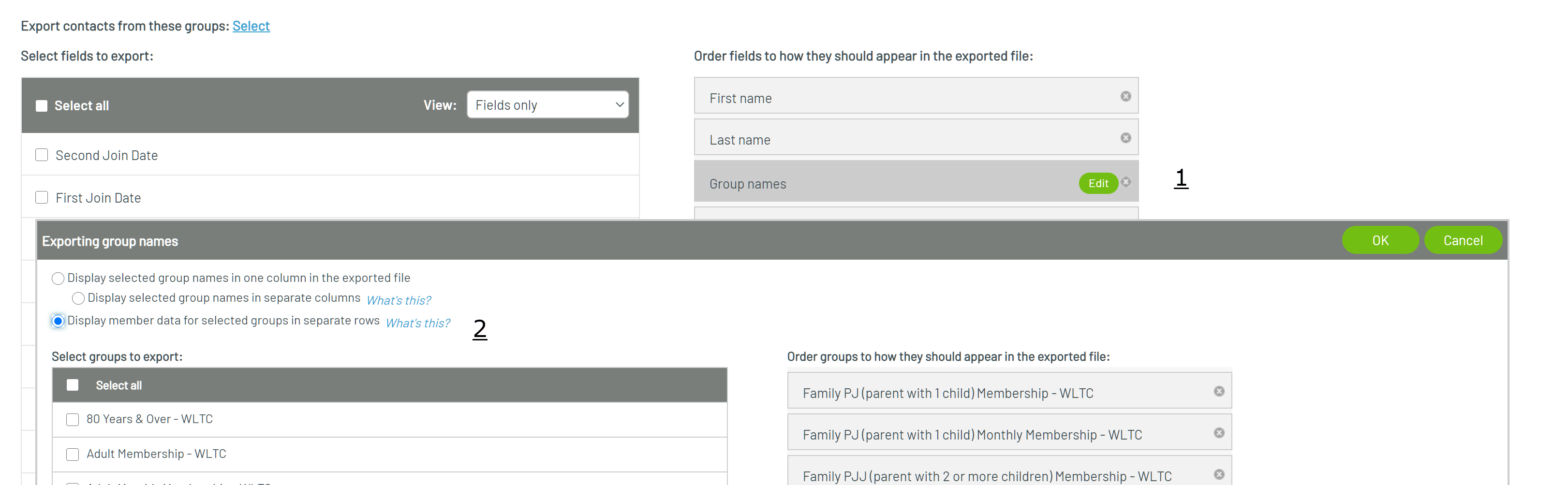
- Click on the Edit button next to Group Name (step 1 below) and then on 'Display member data for selected groups in separate rows - step 2 below.
- Export the data and this will give you the expire dates.
- You can then use the MS Excel function of =+1 beside each cell to get the renewal dates
Comments
0 comments
Please sign in to leave a comment.